Your profile photo is often the first thing a recruiter, client or conference attendee sees, long before they read a word you have written. For years the choice was simple: book a photographer or make do with a cropped holiday snapshot. AI headshots have added a third option that is fast and affordable, but not right for everyone. This guide compares AI headshots with traditional studio portraits, explains how to prepare if you go the AI route, and covers the questions of authenticity and privacy that deserve more attention than they usually get.
Key takeaways
- A clear, current, well-lit photo that actually looks like you matters more than which method produced it.
- AI headshots are generated from your selfies; input quality and variety largely determine output quality.
- Studio portraits still win for flagship brand imagery, press, and situations where exact likeness is critical.
- Choose AI results that are faithful to your real appearance, and follow any disclosure norms in your field.
- Face images are sensitive personal data. Before uploading, find out how they are stored, used and deleted.
Why your profile photo matters
People form impressions from faces quickly, and a profile photo sets the tone for everything that follows. It does not have to be glamorous; it has to be credible. A good professional photo signals that you take your presence seriously, and it helps people recognize you when you meet on a video call or at an event.
LinkedIn and professional networks
On professional networks, your photo appears beside every comment, message and search result. Profiles with a clear, friendly headshot generally feel more trustworthy and approachable than those with no photo, a distant group shot or an outdated image. The small circular crop means your face should fill most of the frame.
Company websites and team pages
Team pages work best when every photo shares the same background, framing and lighting. Inconsistent photos (one in an office, one on a beach, one in black and white) make a company look disorganized. Consistency is also one of the areas where AI can help a growing team, since new hires can match the existing style without a reshoot for everyone.
Speaker bios, press and publications
Event organizers and publications need high-resolution images that print well and crop to different shapes. They also need you to be recognizable on stage. Here, likeness and resolution matter even more than usual.

What AI headshots are
An AI headshot service takes a set of ordinary photos of you, usually selfies or casual shots, and produces new, professional-looking portraits. Depending on the approach, the system either adapts a generative model to your facial features so it can render new images of you in chosen outfits and settings, or it enhances and restyles your existing photos by relighting them, replacing the background and cleaning up detail.
The first approach offers more variety; the second stays closer to real photographs. Both rely on the same underlying technologies discussed in our complete guide to AI photo enhancement: neural networks that have learned what faces, lighting and fabric look like, and that can predict plausible detail.
That word "plausible" is important. A generated headshot is the model's best rendering of you, not a photograph of a moment that happened. Most results look natural; some drift subtly, with a slightly different jawline, teeth, eye shape or hairline. Choosing results carefully is part of the process.
How to prepare your selfies
With AI headshots, the input photos are your photo shoot. Time spent here pays off more than anything else.
Lighting
Face a window during the day so soft light falls evenly on your face. Avoid direct midday sun, which causes squinting and harsh shadows, and avoid overhead lights that create dark eye sockets. Do not mix a window on one side with a warm lamp on the other. Take a few photos outdoors in open shade as well, for variety.
Variety
The model needs to understand your face from several viewpoints and in several conditions. Aim for a mix of:
- Straight-on and slight left and right angles
- Different expressions: neutral, a closed-mouth smile and a natural open smile
- A couple of different tops and, if you vary it in daily life, different hairstyles
- Different backgrounds and locations, so the model does not "learn" your kitchen wall as part of you
- Head-and-shoulders framing, with a few slightly wider shots
What to avoid
- Filters and beauty modes. These alter skin, eyes and face shape, and the model will faithfully learn the distortion.
- Sunglasses, hats and heavy shadows that hide features.
- Other people in the frame, which can confuse the model and raises consent issues.
- Old photos. Use recent images so the result looks like you today.
- Close-up wide-angle distortion. Holding the phone very close enlarges the nose and shrinks the ears. Use a timer, the rear camera, or a friend, and keep some distance.
Tip: If you usually wear glasses, include plenty of photos with them on. You want the headshot to look like the person people will actually meet.
Choosing background and attire styles
The right style depends on your field and where the photo will appear. A few reliable directions:
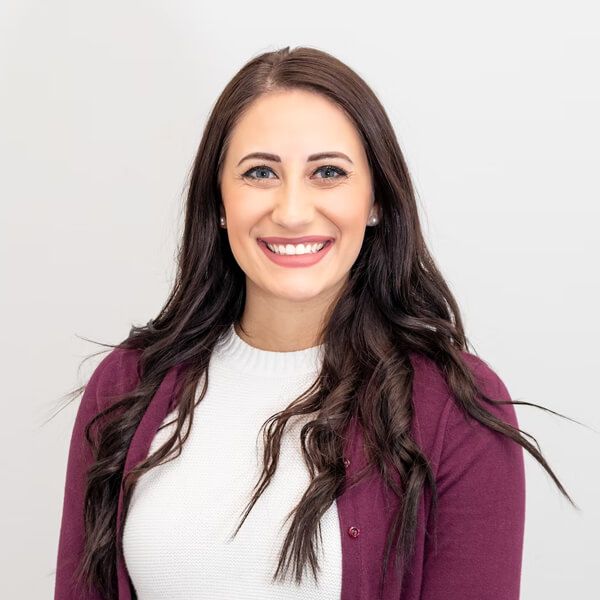
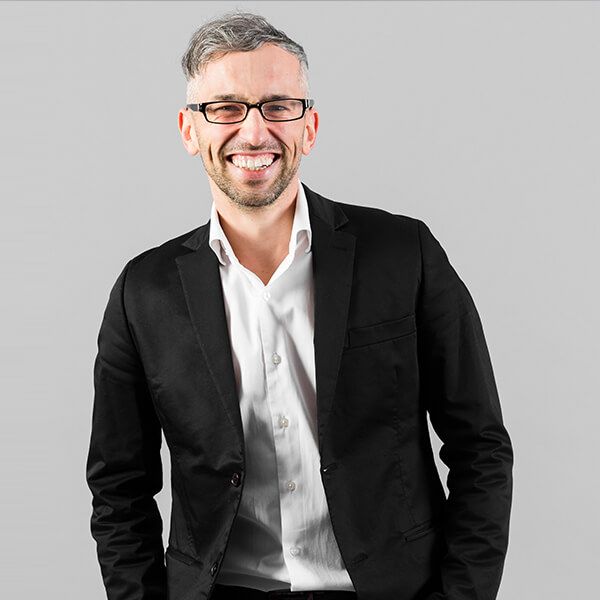
- Neutral studio backdrop. Light gray, off-white or soft charcoal. Timeless, works everywhere, and ideal for matching team pages.
- Softly blurred office or urban setting. Adds context and warmth for consultants, founders and client-facing roles.
- Outdoor natural light. Approachable and relaxed; popular for creative, wellness and education professionals.
- Dark, dramatic backdrop. Strong for speakers, executives and creative leaders, though it can feel formal on small screens.
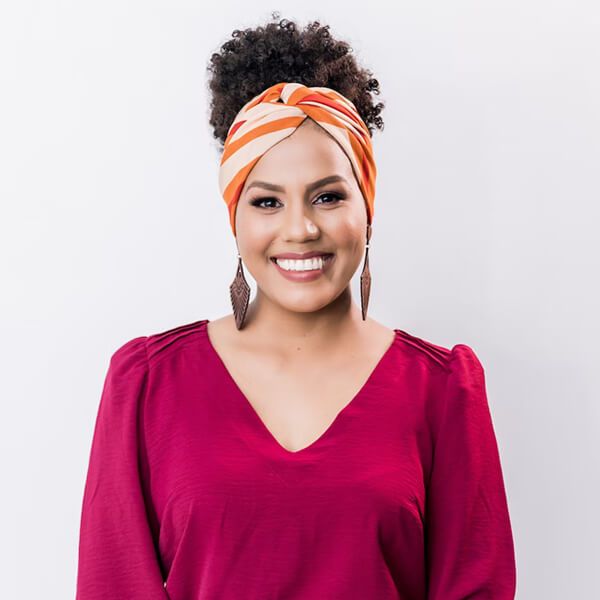
For attire, choose what you would actually wear to meet a client in your field. Solid, mid-tone colors are safest; very fine stripes and busy patterns can render poorly. If your company has a dress code or brand colors, align with them. The goal is not to look like someone else's idea of a professional, but like the best version of how you really show up at work.
These examples show three common styles:
Studio portraits: pros and cons
A skilled portrait photographer brings things that are hard to replicate: controlled lighting shaped to your face, direction on posture and expression, and the ability to capture a genuine moment of you.
Pros
- An authentic photograph, with exact likeness
- Expert direction that brings out natural expressions, which is especially valuable if you feel awkward on camera
- High resolution and quality suitable for print, press and large displays
- Creative control for personal branding and campaign imagery
Cons
- Higher cost, often including separate fees for retouching and extra images
- Scheduling, travel and time away from work
- Changes to style or background usually require a new session
- For distributed teams, coordinating a consistent look across cities is difficult
AI headshots: pros and cons
Pros
- Fast turnaround, often within hours or a day
- Typically far less expensive than a studio session
- Many backgrounds, outfits and styles from one set of selfies
- Easy consistency for remote and growing teams
- No need to travel or schedule
Cons
- Likeness can drift; not every result looks exactly like you
- Occasional artifacts such as odd hands, mismatched earrings or strange collar details
- Quality depends heavily on the selfies you provide
- Some contexts expect or require a real photograph
- Your face data is uploaded to a service, which raises privacy questions
AI headshots vs. studio portraits at a glance
| Factor | AI headshots | Studio portrait |
|---|---|---|
| Cost | Generally low | Generally higher |
| Time commitment | Time to take selfies; results in hours or days | Booking, travel, session and retouching |
| Likeness | Usually good; review needed | Exact |
| Variety of looks | Very high | Limited to the session setup |
| Team consistency | Easy across locations | Easy in one location, hard across many |
| Print and press use | Depends on resolution and policy | Ideal |
| Authenticity | Generated or heavily processed image | Real photograph |
| Best for | Profiles, team pages, quick refreshes | Executives, speakers, personal brands, press kits |
Many people use both: a studio portrait every few years as the anchor image, with AI variations for different platforms and seasons. Pix Me offers the AI side of that equation, with human review built in.
Authenticity and disclosure
A profile photo is a promise: "this is what I look like." AI does not break that promise by itself; choosing an unrealistic result does. Pick images that match your real face, age, build and features. Minor polish, such as better lighting, a tidy background or a neutralized blemish, is what photographers have always done. Slimming your face, changing your eye color or making you look a decade younger crosses into misrepresentation, and it tends to backfire the moment you appear on a video call.
Disclosure norms vary. For a LinkedIn profile or company team page, a faithful AI headshot is widely used without a label. But some contexts have stricter rules: journalism, official identification, certain professional registries, dating platforms, and some event or publisher guidelines may require real photographs or disclosure of AI generation. When in doubt, check the policy or ask. If your organization is setting a policy for team photos, being transparent about the method is usually the safest, most respectful choice.
The best headshot is the one that makes people recognize you instantly when they finally meet you.
Privacy of your face data
Photos of your face are biometric-adjacent personal data, and in many jurisdictions they receive special protection. Frameworks such as the EU's GDPR give people rights over how such data is processed. Before uploading selfies to any AI headshot service, ask these questions:
- Where are my photos stored, and for how long?
- Is any model adapted to my face deleted after my order, and when?
- Are my photos used to train the provider's general models? Can I opt out?
- Can I request deletion of everything, and how do I confirm it happened?
- Are my photos shared with third parties or processors, and where are they located?
A trustworthy provider answers these in plain language. At Pix Me, how we handle uploaded images is set out in our privacy policy, and you can send questions or deletion requests to [email protected]. If you are commissioning headshots for a team, make sure each person consents individually to their photos being processed.
Never upload photos of someone else to generate their headshot without their explicit permission.
Professional profile photo checklist
- Decide where the photo will be used (profile, team page, speaker bio, print) and what size and shape it needs.
- Choose a method: studio, AI or both, based on budget, timeline and how critical exact likeness is.
- For AI, take a varied set of recent, unfiltered selfies in soft, even light.
- Pick a background and attire style that fits your field and, for teams, a shared style guide.
- Read the provider's privacy terms and confirm how your photos are stored and deleted.
- Review results at full size and reject any that change your features.
- Ask a colleague which option looks most like you.
- Check disclosure rules for any platform or publication with specific requirements.
- Use the same image across your professional profiles for recognition.
- Plan to refresh your photo when your appearance changes noticeably, or every few years.
If you are building a broader personal or company brand, our guide to visual content marketing for small businesses shows how headshots fit into a consistent visual identity, and our content creation service can help with the rest of your visuals.
Frequently asked questions
Is it acceptable to use an AI headshot on LinkedIn?
Generally, yes, as long as the image accurately represents what you look like and follows the platform's current policies. The key test is recognizability: someone meeting you on a video call should immediately know it is you.
How many selfies do I need for good AI headshots?
Requirements vary by service, but a set of varied, high-quality photos, usually more than a handful and fewer than a hundred, works better than many near-identical shots. Variety in angle, expression, clothing and background matters more than sheer quantity.
Why do some AI headshots not look like me?
The model is predicting a plausible version of your face. Filtered, low-resolution, badly lit or very similar input photos make that prediction harder. Better selfies usually fix it, and you should simply discard results that drift.
Can AI headshots be used for official IDs or passports?
No. Official identity documents have strict requirements for unaltered, recent photographs. Use a compliant photo taken according to the issuing authority's rules.
Can a whole team get matching AI headshots?
Yes, and this is one of the strongest use cases. A shared style (background, framing, lighting and attire guidance) lets remote team members produce consistent photos. Each person should consent to the processing of their own photos.
What happens to my selfies after the headshots are delivered?
That depends on the provider, which is why you should check before uploading. For Pix Me, retention and deletion are explained in our privacy policy, and you can request deletion at [email protected].
Get a professional headshot with Pixme AI
Send a few good selfies and choose your style. Pix Me creates polished headshots that still look like you, with human review and clear privacy practices.
Explore AI headshots